

Mastodon is one of the platforms you can post to from quillcaster today, and it works no matter which instance you call home. You connect it with a normal sign-in, so you never paste a password or token into quillcaster.
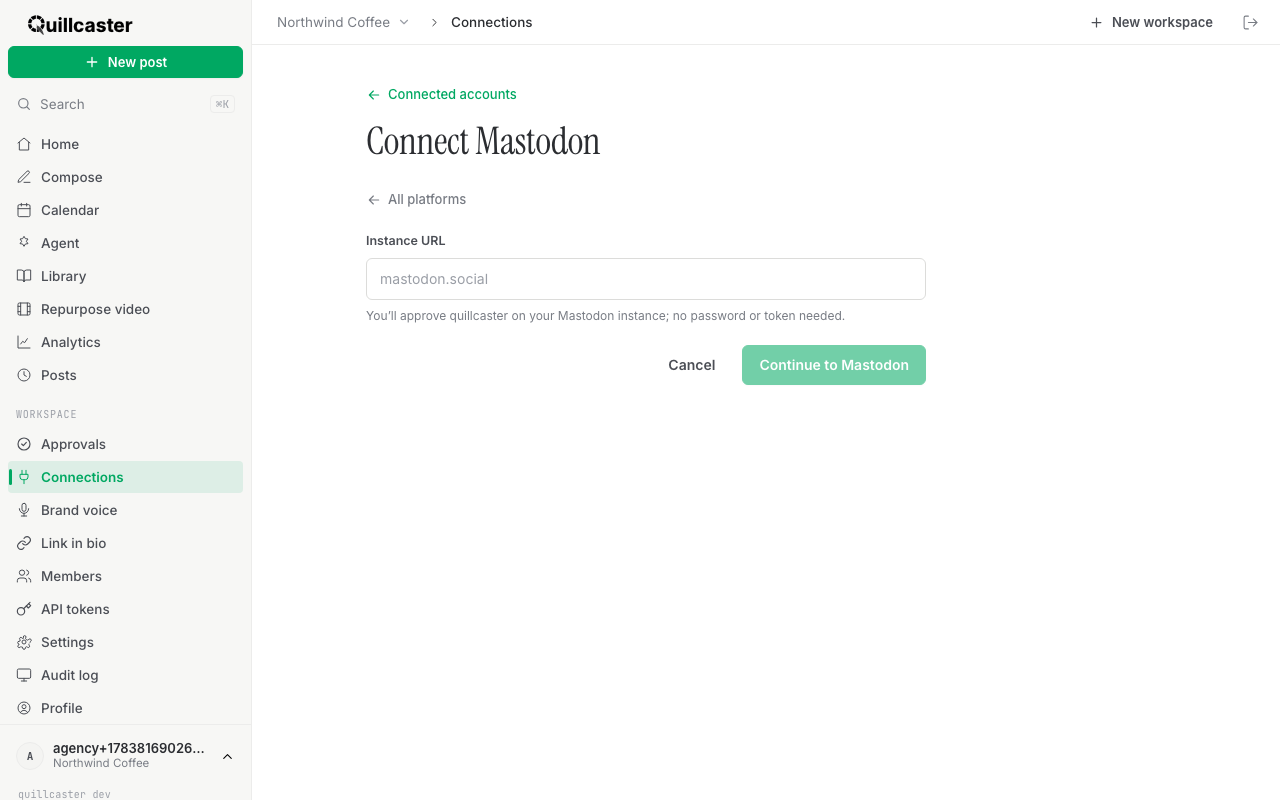
What is connecting Mastodon?
Connecting Mastodon links your Mastodon account to a quillcaster workspace so we can publish your posts there. Instead of handing over a credential, you approve quillcaster through a normal sign-in on your own instance. Nothing secret gets typed into quillcaster at all.
Mastodon is federated, which means there is no single mastodon.com. Everyone lives on an instance, like mastodon.social or your community's own server. Because you approve access on that instance's own site, the approval is more secure: your login stays on Mastodon, and you can withdraw quillcaster's access from your Mastodon settings whenever you like.
If you have connected other accounts before, this is a little different from the credential forms. See Connect an account for how the other platforms work.
Why connect Mastodon?
Mastodon is postable right now, no app review and no waiting. It is one of the fediverse-first platforms quillcaster treats as a first-class citizen, and the sign-in flow works across any instance, so it does not matter where your account lives.
Once it is connected, Mastodon becomes a target for everything else quillcaster does. Write one idea, let the AI shape a version made to fit Mastodon, and queue or schedule it beside your other accounts. Pair it with Bluesky and you have solid open-social coverage in minutes.
How to connect Mastodon
You will need editor or admin access in the workspace. Viewers cannot connect accounts.
- Go to Connections, then click Connect account.
- Choose the Mastodon card.
- In Instance URL, type your instance address, like
mastodon.social. That is the server your account lives on. - Click Continue to Mastodon. Your browser hands off to your instance.
- On your instance's own page, review what quillcaster is asking for and approve it.
- You come straight back to quillcaster, and the account shows a green Active tag.
The whole point of that hand-off: you sign in and approve on Mastodon's site, not ours. We never see your password, and there is no token to copy.
If something goes wrong
If quillcaster says it could not reach that instance, check the address. Enter just the server, like mastodon.social, not your full profile URL or your @handle. A small typo in the domain is the usual cause.
If the approve step does not send you back, make sure you finished signing in on the instance first. Some instances ask you to log in before they can show you the approval screen.
What to do next
With Mastodon connected, write your first post or let the AI adapt one idea for every platform. Want to see the bigger picture first? Take a look at our features.
