

This page explains what a brand voice is in Quillcaster, why you would set one up, and how to create one and use it when you adapt an idea.
What is a brand voice?
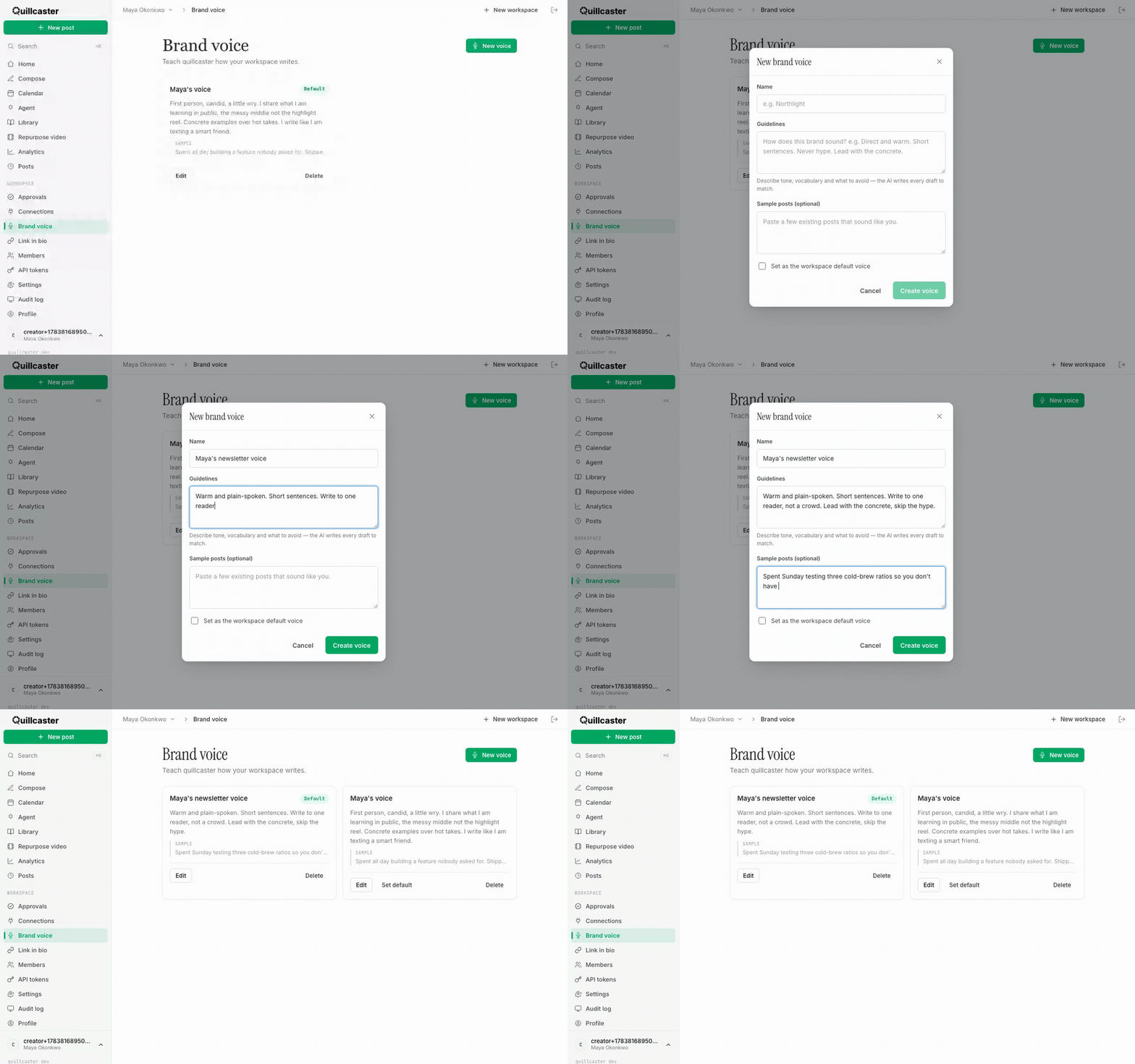
Out of the box, Quillcaster writes clear, generic drafts. A brand voice is a short profile you write that describes your tone, your vocabulary, and what to avoid, and Quillcaster uses it when it adapts your ideas. It is made of a few plain-text fields:
- Name so you can tell your voices apart, for example a client or product name.
- Guidelines, which you write, describing how the brand sounds: tone, sentence length, vocabulary, and anything to steer clear of. This is the heart of the profile and it is required.
- Sample posts (optional): paste a few existing posts that already sound like you, so the AI has concrete examples to match.
One important thing to know up front: you describe the voice yourself. It is not silently learned from your past posts, so there is no black box guessing your tone from your history.
Why set a brand voice?
Without one, every draft sounds capable but anonymous, and you end up rewriting each post to sound like you. A voice profile does that reshaping for you: the same idea comes out warm or dry, plain or punchy, exactly as you described, across every platform at once. And because you write the guidelines, you stay in control of how the brand sounds rather than hoping the AI guesses right. If you run several brands, a voice per workspace keeps each one distinct.
How to create a brand voice
- Open Brand voice from the sidebar.
- Click New voice.
- Give it a Name.
- Write your Guidelines. Be concrete, for example: "Direct and warm. Short sentences. Never hype. Lead with the concrete."
- Optionally paste a few Sample posts that sound like the brand.
- If this should be the voice every new draft uses, tick Set as the workspace default voice.
- Click Create voice.
You can edit a voice any time from its card, promote a different one with Set default, or remove one with Delete. Deleting a voice leaves existing drafts alone; future drafts that used it simply fall back to no voice.
How to set a default voice
At most one voice per workspace is the Default, marked with a green tag and kept at the top of the list. The default is the voice Compose pre-selects for you, so if most of your posting uses one voice, make that the default and you rarely have to think about it again.
How to pick a voice in Compose
In Compose, the Voice selector sits under the idea box. Leave it on Workspace default to use your default voice, or choose a specific one before you click Adapt. Every draft on the board is then written to match that voice. See Adapt one idea for every platform for the full Compose flow.
A voice per client, for agencies
Voice profiles are scoped to a single workspace, so if you run several brands, keep each brand in its own workspace with its own default voice. Switching workspaces switches the voice set automatically, and one client's tone never leaks into another's drafts. See Quillcaster for agencies and Workspaces and switching for more on multi-brand setups.
