

This page explains what a connected account is, why a workspace needs one before it can publish, and how to add accounts, read their status, and fix one that has gone stale.
What is a connected account?
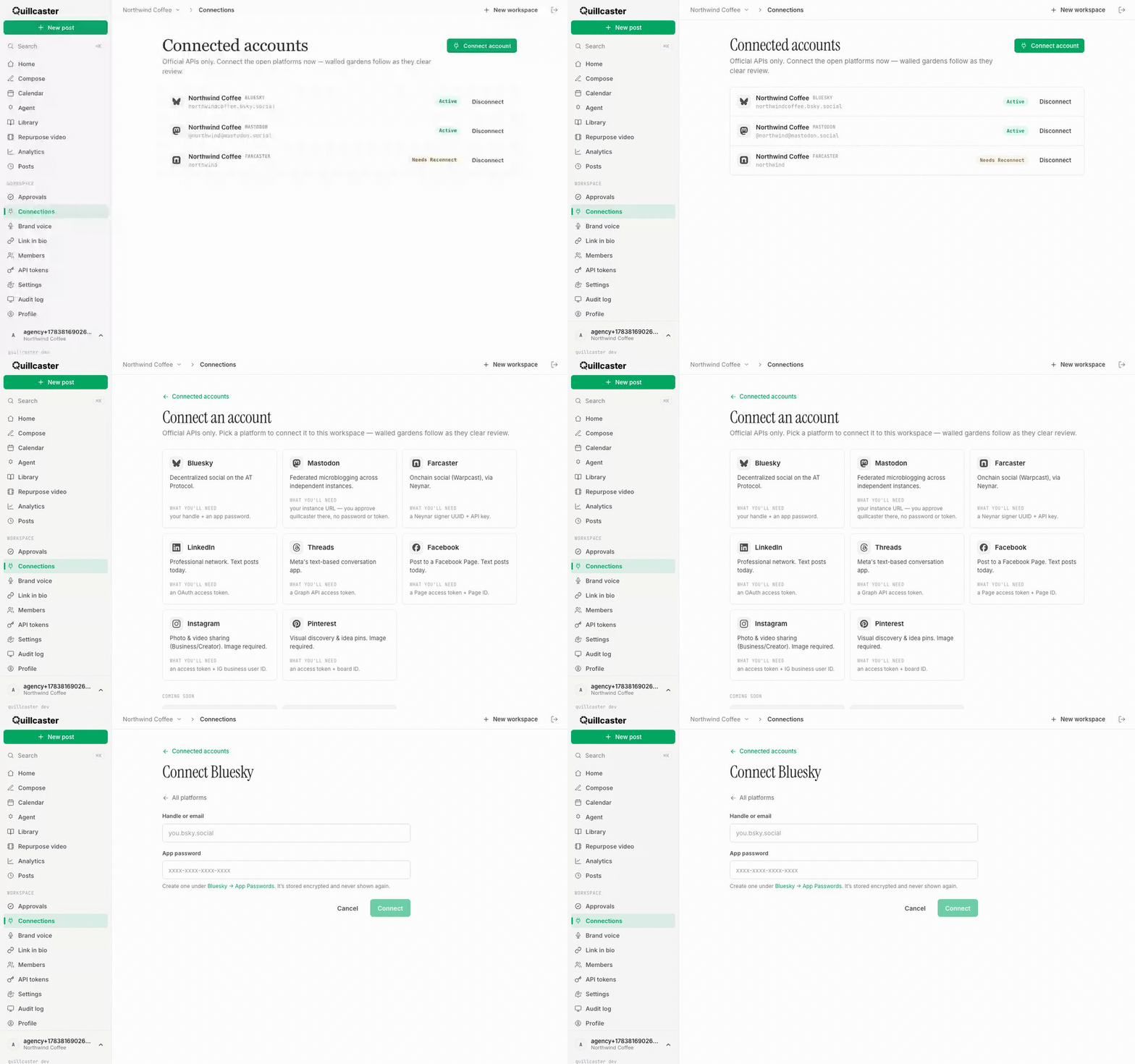
A connected account is a link between Quillcaster and one of your social profiles, set up on the Connected accounts page. It is where you add accounts, check their health, and remove them. Quillcaster uses official platform APIs only, so what you connect is exactly what the platform allows. Each connected account carries a status tag:
- Active (green): the account is healthy and ready to publish.
- Needs reconnect (orange): the stored credentials have gone stale and need refreshing before the account can post again.
- Revoked (gray): access was withdrawn on the platform's side.
Only Active accounts can publish, so it is worth glancing at this page if a post fails.
Why connect an account?
Quillcaster drafts your posts, but it needs your permission to actually send them out, and a connection is that permission. Before you can publish or schedule, a workspace needs at least one connected account. Connecting through official APIs also keeps your logins safe: you approve access on the platform's own side rather than handing over a password, and you can withdraw it whenever you like.
How to start a new connection
- Open Connected accounts from the sidebar.
- Click Connect account.
- Pick a platform from the grid to open its connect form.
- Follow the steps for that platform, then confirm. You return to the list with the new account showing.
Connecting is limited to workspace editors and admins. Viewers see the list but cannot add or remove accounts (see Invite members and roles).
The platforms you can connect and post to today
- Bluesky: enter your handle and a Bluesky app password. Full steps are in Connect Bluesky.
- Mastodon: enter your instance address and approve Quillcaster on your own instance. There is no password or token to paste. Full steps are in Connect Mastodon.
- Farcaster: connect through a Neynar signer, using a Neynar signer UUID and API key.
Other platforms, including Instagram, Facebook, LinkedIn, Threads, and Pinterest, are rolling out. You can already draft for them in Compose, but connecting them is not a simple in-app click yet; their forms currently expect developer access tokens rather than a one-tap sign-in. X, TikTok, and YouTube are shown as coming soon.
How to fix a "Needs reconnect" account
There is no separate reconnect button. To refresh a stale account, remove it and add it again:
- On the account showing Needs reconnect, click Disconnect and confirm. This clears its stored credentials and its publication history.
- Click Connect account and set it up again from scratch, exactly as you did the first time.
The freshly connected account returns as Active and is ready to publish. Once you have a live connection, head to Adapt one idea for every platform or see all features to start posting.
